The assistants answer the person, not only the question
Every major assistant now keeps some context about the person asking, and uses it when it answers:
- ChatGPT can draw on past chats, saved memories, custom instructions, files and connected apps when Memory is on, and decides itself which of it is relevant to a response (OpenAI). It also estimates where you are from your IP address when it searches the web (OpenAI).
- Claude can build memory from your chats, and memory is on by default on the Free, Pro and Max plans (Anthropic).
- Gemini can use information you asked it to save, and can look at past chats before it responds (Google).
- Google’s AI Mode can use previous searches and activity saved in your Search history, for people over 18 with history and personalized recommendations turned on (Google).
So the head of IT at a 300-bed hospital and the founder of a 10-person agency can ask the same words and see different lists. And most buyers do not leave it to memory: they say who they are in the question itself, “we are a 40-person SaaS in Germany with about €2,000 a month for tools”, because that is how you get a useful answer.
What a check without a buyer misses
A clean check is the right starting point. Teddit asks every question fresh, with web search on and no personal history, which is close to what someone who is not signed in sees. That answers the general question: when anyone asks this, are you named? (How to check if ChatGPT mentions your brand covers it step by step.)
It does not answer the narrower one your sales team cares about: when our buyer asks, with their size, budget, country and constraints in the question, are we still named? A brand that is a safe general pick can drop out once the buyer says “regulated industry” or “under €500 a month”, and a niche brand can appear only then. The words a buyer adds are part of the question, and the answer follows them.
How buyer personas work in Teddit
A buyer persona is who is asking, in their own words. It has three parts:
- A short name for you, such as “Marketing lead at a mid-size SaaS”.
- The buyer’s words, up to 600 characters, written the way that buyer would introduce themselves to an assistant.
- A country and a language, if this buyer is somewhere other than the site’s market. When set, the assistants answer that buyer’s questions from there and in that language.
You attach a persona to the prompts where who asks matters, one prompt at a time or many at once. In every scan, the persona’s words go before the question as one message, the way a person types them, on all six assistants. It is a message, not a hidden instruction, so it works the same whether the answer is read from the assistant’s app or through its API. For Google’s AI Overviews and AI Mode the words and the question go in together as one search, so keep a persona short for the prompts you track there.
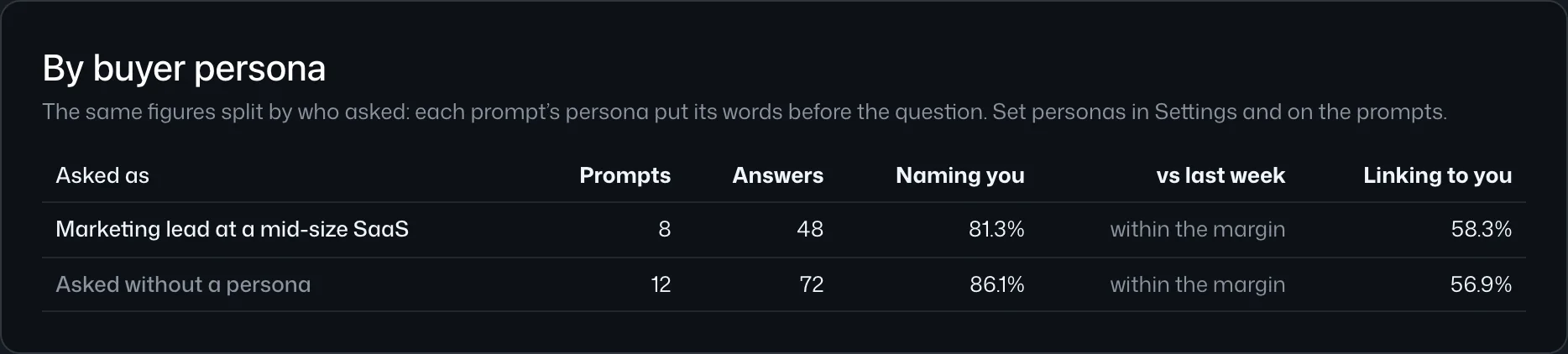
Each answer keeps the exact words it was asked with, shown as “Asked as” in the answer view; edit the persona later and the answers you already have do not change. The dashboard then splits the figures by who asked: a row per persona with its prompts, answers, share of answers naming you with its margin, the move since the period before and the share linking to you, and a row for the prompts asked without a persona (By buyer persona in the docs).
Personas cost nothing extra: an answer is priced the same with or without one (pricing).
Writing two or three personas that work
Start with the two or three kinds of buyer that bring you most of your revenue, not every segment you can think of. For each, write one or two sentences in the first person, as that buyer would type them:
- Role and company: “I run marketing at a 40-person B2B SaaS.”
- Market: the country, and the language if it is not the site’s. Set them on the persona as well, so the answer comes from there.
- The constraint that changes the choice: budget, team size, a platform they are tied to, a regulation they work under.
Three examples for an email marketing tool, with invented details:
- “I run a 12-person agency in Amsterdam and manage newsletters for retail clients.”
- “I run marketing at a 40-person B2B SaaS in Germany; we have about €2,000 a month for tools.”
- “I am the only marketer at a Shopify store in the US with 20,000 subscribers.”
Leave every brand name out of the persona, yours and your competitors’. “We currently use Brightloop” tells the assistant what to answer; the check is whether it gets there on its own. The questions follow the same rule (how to choose the prompts worth tracking).
A question is asked as one persona at a time, and a site holds each wording once. To compare two buyers on the same need, add the question for each, worded the way each would ask it. Buyers rarely ask in the same words anyway.
Reading the answer per buyer
The question stays a yes or no, now per buyer: is the brand named when this buyer asks? Read the persona rows on the dashboard first:
- Named for one buyer, not another. If the SaaS persona sees you named and the store owner does not, the gap is in what the assistants find about you for that buyer: a page for small stores, a listing on the sites they cite for that question.
- Who is named instead. Open the prompts asked as the weaker persona and look at the brands named in your place. They are rarely the same competitors for every buyer.
- Within the margin or not. Answers vary from one asking to the next (why), so a small gap between two personas can be noise; the dashboard says when a move is within the margin.
Then check again next month. The persona rows show the move since the period before, so you see whether the work for one segment changed what that segment is told.
Getting started
Add two or three personas in the site’s settings, under Buyer personas, attach them to the prompts where who asks matters, and run a scan. Keep the rest of your prompts bare: they are your general baseline, and the dashboard shows them as their own row. There is no subscription; you top up from $20 and see the price of a scan before it runs.
Sources
- Memory in ChatGPT, OpenAI Help Center: the sources Memory can draw on and how it personalizes responses.
- Searching the web with ChatGPT, OpenAI Help Center: location from the IP address.
- Use Claude’s chat search and memory to build on previous context, Anthropic (Claude Help Center).
- Save info and reference past chats in Gemini Apps, Gemini Apps Help.
- Get AI-powered responses with AI Mode in Google Search, Google Search Help: personalization.