Being linked is different from being named
Named means your brand appears in the text of the answer. Linked means the answer points to a page on your own domain, as a cited source or as a URL in the text. Teddit records the two separately for every answer.
They come from different parts of how an answer is put together. The name reflects what the assistant chose to recommend or mention. The link reflects which pages it found and leaned on while writing. One can happen without the other, which gives four cases.
| Linked | Not linked | |
|---|---|---|
| Named | Recommended, with your own page as a source. The strongest position. | The assistant knows you, but what it says about you comes from elsewhere. |
| Not named | Your page was used as a source, and the reader was not pointed to your product. | You are not part of this answer. |
The Prompts screen shows these cases answer by answer. The Pages screen turns the question around and starts from your site: which of its pages did the assistants link to?
What the Pages screen lists
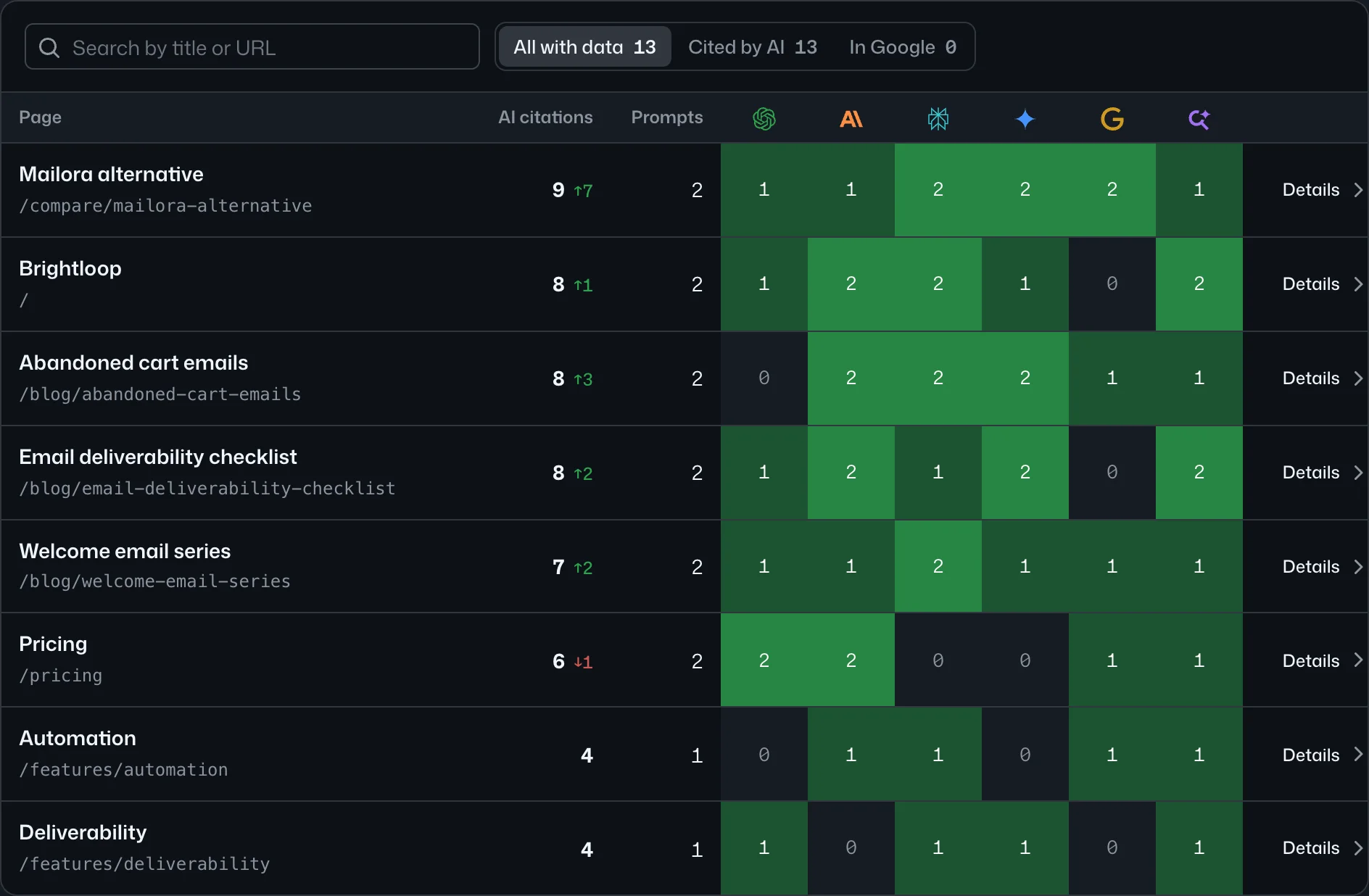
The screen lists the pages of your site, read from its sitemap with their titles. The pages with data come first. For each page you see:
- how many answers linked to it, and the change from the period before;
- how many of your prompts led to it;
- the count per assistant, so you can tell a page every assistant uses from one that a single assistant favours;
- its best place in Google for the web searches the assistants ran.
Open a row and you get the prompts behind it: the exact questions for which an assistant linked to that page, which assistants did, and the searches they ran with where your page and the top result stand in Google. Each prompt opens to the full answers.
Above the table sit four totals: how many of your pages were shown, how many answers link to you, how many of your prompts lead to your site, and your share of all the links in those answers.
Three things are worth checking on a first read.
- How concentrated the list is. If two or three pages collect nearly all the links, your visibility as a source rests on them. Know which they are before anyone redesigns or retires them.
- What kind of pages they are. Guides, comparison pages, pricing, documentation, the home page. The mix shows what the assistants use your site for.
- Whether the prompts fit the page. A pricing page linked for pricing questions is working as intended. A two-year-old blog post linked for a buying question deserves a second look.
A page cited where you are not named
The most useful rows are the ones where a page of yours is linked for a prompt, and the same answer does not name your brand. In the Prompts list you can find them with the filter “Linked, not named”.
Take a made-up case. Brightloop, an email marketing platform, has a guide at brightloop.example/guides/welcome-sequence. An assistant cites it for the prompt “How do I set up a welcome email sequence for a new online shop?”. The answer explains the steps, credits the guide, and then suggests Mailora and Inboxly as tools for the job.
What this tells you for certain is narrow: the assistant found the page relevant and trusted it enough to use. Why it stopped short of naming you is a question to investigate. Some explanations to test:
- The page teaches the topic and never connects it to the product. A reader, human or machine, can finish it without learning that Brightloop does this.
- The assistant took facts from your page and recommendations from another, such as a round-up that lists other brands. The other sources of the same answer will show it.
- The question is informational, and the assistant added product suggestions on its own initiative from what it already associates with the task.
You can check each of these by opening the prompt. The answer is there in full, with its sources grouped: your site, third-party pages, competitors’ sites. Read where the named brands came from.
The pages that never appear
The list is also informative by omission. If your comparison page, your pricing page or the guide your team is proudest of sits among the pages without data, then no assistant linked to it for any prompt you track in that period.
Those pages are listed at the bottom of the screen, under “No data yet”. Your own AI can also ask through the MCP server for the pages in your sitemap that no current answer links to.
Before drawing a conclusion, check the prompts. A page can only be linked for a question somebody asked. If none of your tracked prompts is about deliverability, your deliverability guide will not show up, however good it is. Often the first fix is a prompt, not a page. We covered how to build the list in How to choose the prompts worth tracking.
What to do with the list
Treat the Pages screen as a content backlog that the assistants have sorted for you. It falls into three piles.
- Linked, and you are named. Protect these. Keep them accurate and current, and do not change their URLs casually.
- Linked, and you are not named. These pages already have the assistants’ attention. They are candidates for an edit that says plainly what your product does about the problem.
- Prompts that matter where no page of yours is linked. These are gaps. Either you have no page that answers the question, or the assistants prefer someone else’s.
What to write, what to rewrite and in which order is your decision. Teddit measures. It does not produce recommendations, and that is deliberate: a generic tool does not know your product, your positioning or your constraints. You do, and so does your own AI once it can see the data. Connect it through the MCP server and it can query the pages, the prompts and the stored answers alongside everything else it knows about your business.
Then measure the result the slow way. Note the date you changed a page and watch the same prompts over the following weeks. A change to a page does not guarantee a change in the answers. Whether it did is exactly what the next few scans will show.